POPS realboot is a plugin for the PSP that let’s you authentically boot your PS1 games with the classic two part SCE intro for the original PlayStation. By authentic, I mean the real, true PS1 boot intro that includes the orange diamond on white SCE logo that naturally blends into the PS logo.
It’s important to note that this is NOT a video intro. This is the real two part intro as it is originally rendered on the PlayStation (that means it looks crisp and sounds clean on any PSP!). The very extremely specific problem I was trying to solve here was being able to enjoy the full boot intro without sacrificing game compatibility, so don’t worry, while this plugin uses Sony’s official PS1 BIOS file, it cleverly unloads and swaps in the PSP’s HLE BIOS (the one that you’re used to) for maximum compatibility. A full swap was necessary in this case as I wanted to achieve the full two part sequence together as it was on the PS1 which most importantly has the SCE boot sound overlapping/melting into the PS boot sound, something I haven’t seen done consistently in any form aside from the original BIOS.
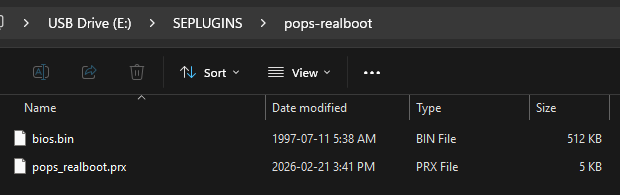
To use this plugin simply extract the pops-realboot folder into your SEPLUGINS folder, place your dumped PS1 BIOS file into the folder and rename it bios.bin, then enable the plugin for POPs as ps1 in your PLUGINS.TXT or add an entry in your POPS.TXT. Boot your favourite PS1 game and feast your eyes on the full boot sequence of the PS1!
**Note: Use Original screen mode within the POPs menu to get the SCE diamond to render as close to vanilla as possible
Download:
If you like my work, grab me a cup of coffee for the effort: https://buymeacoffee.com/fzzylogic
If you need help installing or setting it up, let me know on discord: https://discord.gg/fuzzylogic