PSP Sidecar is a custom plugin / homebrew app for the PSP console that allows you to cache your library of PSP games (compatible with gclite!) directly to your memory stick to drastically speed up booting into the XMB, loading games from the memory stick, and sleeping/restoring from standby. The classic XMB experience is maintained even with these speed boosts!
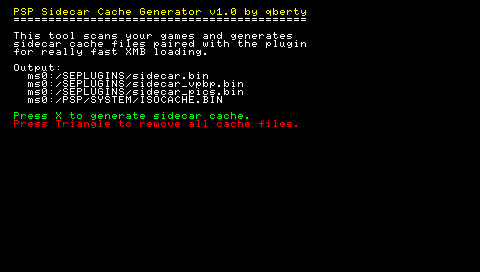
After caving to my nostalgic need to get a new PSP 1000 a couple weeks ago, I decided to bring my old plugin back from the grave of the old PSPUpdates / QJ days (yes I’m that old) and modernize / improve it to work on the latest CFW (ARK-4). Skip the rant and jump to the download already!

Back then, there was no solution to having large memory cards, we were stuck with MemoryStick ProDuo’s and had to choose which games we wanted in our rotation. This limitation is also what bred a lot of innovative ideas (like external plugins/irshell ISO streaming) and seeing what you could really do with the PSP. I had created this plugin (among a plethora of other well known apps and plugins from that era) to solve one of the pain points of dealing with the way Sony designed the firmware at that time. The use of fat (the filesystem, not your triglycerides) as well as a peculiar way of loading the game list within the XMB was interesting to say the least.
PSP Sidecar was my attempt at solving that problem with an overengineered plugin and app. It essentially takes advantage of a lot of known set backs of the filesystem as well as how the original firmware likes to seek. You use the homebrew app and scan / generate a cache file of your games’ headers and byte level locations that act like a heavily optimized sidecar to be small enough to fit in the PSP 1000’s RAM and still be useful enough to try and eliminate any need to seek the (very) slow memory stick when listing your games through the PSP’s XMB.

This results in an extremely quick cold boot to XMB, as well as almost a 10x speed boost to loading your game list. I always found that having such a large library of games was really only appealing if I could get to them as quick as I could leave them (I know, classic Netflix syndrome). The only downside to using cache files is that you must refresh the cache using the app on the PSP every time you add or remove games to keep it as fresh as possible so the firmware doesn’t miss a cache hit forcing the XMB to lose all those speed gains.
Now while I’ve updated PSP Sidecar to be compatible with ARK-4 it still contains over half of the original structure / code, perhaps I’ll toss it through an LLM slop machine to get it organized / properly commented and thrown up on GitHub when I have some time if there’s any interest. If you’re curious about exploring the same concepts here’s a brief rundown of what I did to make it work (and some extra things I had to do to update it for ARK-4):
The first speed boost was doing the classic ol’ free space seek skip (which some would just remove from the firmware entirely which I thought was a bit too aggressive). In this case, since we’re running under the need of the user to always keep a fresh cache we can take this win for a quick boost into XMB. We hook into sceIoDevctl and serve our precomputed value as “free space” directly to the system which avoids an entire full FAT32 cluster scan on boot (which can take up to 5-8 seconds and even more on larger sdcards). A cheap win, but a good one. I know it used to be a bit controversial to feed the system precomputed space, but for the purposes of someone who isn’t constantly messing around with files on their memstick and wants to set everything up once and just use the damn thing, I think this is a fine compromise. If you absolutely hate this premise and don’t care for speeding up XMB boot, you can delete the sidecar_xmb.bin cache (that’s inside your SEPLUGINS folder after generating) and the plugin will skip it.
Now the main optimizations are greater than the sum of their parts when browsing the XMB in general. We conditionally hook into dopen, dread, dclose etc. to grapple with either the system or GCLite doing any funny business. Caching the directory listing, intercepting ARK when it tries to parse PARAM/ICON from each individual ISO/Game and serving our cache instead, and the most important thing for the speed up: ISO9660 synthesis sector by sector directly in RAM to feed those juicy SFO’s and ICON0’s with a cached VirtualPBP struct (when opening your GAME folder your PSP is constantly seeking the disk for your ISOs, opening them up, grabbing the PARAM.SFO’s and ICON0 image assets, then closing it. It does this for each ISO file. All of those unneeded operations add up!).
I also had to adapt my old read ahead proxy cache to help lower disk seeks per game highlight as well as increasing the general I/O by preventing CPU stalls with a combination of DMA aligned buffers and that extremely pesky sceIoGetstat of which, precomputing the cache files ahead of time using the systems own timestamps saves a little more than 20-50ms per ISO. Another free win comes from pre generating the ISOCACHE.BIN that ark likes to cold boot parse. We feed that directly skipping that disk seek as well.
Another cool insight I realized entirely by accident when trying to benchmark the speed so far, was I found a measurable improvement to the cache file sector byte code by matching exactly the virtual ISO sector layout order of game assets (ICON1 -> PIC0 -> PIC1 -> SND0) and if stored sequentially in that order it could maximize the read ahead cache hits wayyyyy more effectively. Just a cool quick way of dealing with the slowness of the memory controller. Saves about 5 to 12 ms per ISO. It sounds small, but all of these plus like 4 to 7 more optimizations I did stack up so much to the point where a 128 GB sdcard full of 100 games takes roughly 2 seconds to load the whole game list whereas it typically would take 10-13+ seconds.
I just love the idea of keeping a scene alive with new releases even till this day. Now why would anyone care to spend real man hours in optimizing the XMB cold boot and GAME list loading speed for a 20+ year old little console? Because we still can. I know it’s incredibly old fashioned to spend time improving an experience that, after the improvement, makes the experience *shorter* and lose some of it’s old charm, but I strongly believe that you’ll play more of your library if you can access it faster.
Maybe I should dust off my Vita… anyway, enjoy! Please let me know if you encounter issues. This is of course very experimental and I have not tested it outside of a PSP 1000 with ARK-4 + Game Categories Lite (with square bracket cat folders). Though with 2000+ you’ll have way more ram for hundreds of more games, probably.
[UPDATED]:– Version 1.3 –
– Added support for Leftovers!
– Improved stability
– Fix native USB mode when caching a lot of games/homebrew
– Add sleep / wake support (minimal)
– Version 1.2 –
– Added support for non-GCLite usage (if you just store your ISO’s in the ISO folder with no subfolders)
– Added MAX GAMES option in the INI file (allows you to specify how many games you want to fast load incase you have 300+ games and your PSP is freezing/crashing because of low ram. Capping your games fast load will let you cache them all and still enjoy most speed benefits)
– Removed dependency on ISOCACHE.BIN (Plugin effectively bypasses this completely now)
– Version 1.1 –
– Core updated to support all GCLite category name formats (CAT_ or [] or just names)
– Added support for all EBOOT.PBP’s (includes homebrew, ps1 games, converted minis etc.)
– Cache sorter updated to now try and maintain the original sorting of your games (uses mtime timestamps so it may not work with the plethora of homebrew sorters out there)
– CSO Support
– ZSO / DAX / JSO Spec support (not tested, anyone still rockin’ these?)
– Added a cute little ICON0
Download:
psp_sidecar1.3.zip (32429 downloads )If you like my work, grab me a cup of coffee for the effort: https://buymeacoffee.com/fzzylogic
If you need help installing or setting it up, let me know on discord: https://discord.gg/fuzzylogic