It’s my birthday today, and I have a gift for you all! For the past 2 months since reacquiring a PSP I’ve been spending my spare time working on various little projects for it. This one has taken the longest by far, and took me a bit over a month straight! I am satisfied enough with the results that I think it’s time to let everyone give it a go. A big thank you to TotalKommando for his help testing!
This release is a two in one package that tries to solve the same problems but in new and innovative ways (that have never been done before in this way) on the PSP. The first is storage, and the second is speed.
DratiniFS is full filesystem replacement for Sony’s fatms.prx (yes that means it replaces your fatms.prx file in flash0). It allows the PSP to detect and use FAT32, exFAT, and most importantly ExtremeSpeed, a completely new PSP ISO specific “filesystem” that is extremely fast. I made ExtremeSpeed not as an alternative to FAT32 / exFAT, but to live alongside either one of them on your sdcard. Leftovers is a plugin initially designed to overcome the sdcard size limitation to support up to 1-2tb sdcards. The idea is simple. Create multiple partitions under 400GB inside your 1tb and design an efficient and quick way to “swap” between them without needing to physically touch the sdcard but still allowing the same performance.
Leftovers
Let’s start with Leftovers first as this is installed as plugin that lives in your flash0 and is loaded on every boot. It’s the easiest to use out of the two.
Copy psp_leftovers.prx to your flash0 and it’s accompanying config file to flash1 and boot your PSP with any size sdcard. You can prepare the sdcard itself with any partition manager (I’ve tested with minitool, and aomei). Make up to 12-16 FAT32 (32K) partitions of any size below 441 GB each and fill it with the typical memory stick folders you’re used to (you can also rename each partition to whatever you want). Put your ISO’s / homebrew on each partition as you normally would in each partition to fully utilize the entire sdcard. Launch your games and enjoy maximum storage!
How does it work?
You can imagine your sdcard as an empty big box. When you format your sdcard with the PSP to FAT32, you’re creating a smaller box within that bigger box. This new box has a natural limitation on the PSP. It cannot be any bigger than 441 GB in size (realistically only up to 128 GB is stable). Leftovers allows you to create many more boxes within that bigger box, and it cleverly hijacks the systems normal process of reading from one box and redirects it to another box. This allows you to utilize more of your sdcard including using unsupported sizes like 1-2TB!
One the key things to support larger than 128 GB partitions that I couldn’t avoid with Leftovers was a way to skip the constant lookups and eventual fragmentation, so I had to come up with a custom FAT chain walker to keep things at a reasonable speed. Another thing to note, is I’ve updated PSP Sidecar to support Leftovers! Just keep sidecar’s prx in your flash0 as well to keep it always loading no matter what partition you’ve switched to.
Be sure to configure the config file by choosing if you want whichever partition you switch to, to stay selected even when you restart your PSP, otherwise every time you go to your XMB it will start at the first partition (p0).
When doing research working on the exFAT driver replacement, I was reverse engineering MSSTOR which led me into this interesting idea which I then tackled (thank you NIDs 8e2a988e and 54f1fb11 for causing that horrid bug!). I’m quite satisfied with how it turned out and it definitely serves it’s purpose. That solves storage.
Known Issues / Workarounds
– When using unsupported sdcards (ex. 1TB) plugins don’t properly load
– USB Mode is inconsistent (depends on card speed and a race condition within CFW)
– Waking from sleep in XMB will sometimes flash an unsupported error before fully remounting the partition.
– Sometimes the neon light fading animation I try to show on screen when swapping partitions will sometimes fade in 200ms-300ms later (again, due to another race condition).
– For the life of me I couldn’t make it so that holding L and R blocked XMB directional input when you’re selecting partitions. So when you hold L and R, you still navigate the XMB while you’re also selecting partitions. pls helps me anyone 🙁
DratiniFS with ExtremeSpeed
On to the big one – DratiniFS with ExtremeSpeed. A full replacement for Sony’s built in filesystem that supports a minimal FAT32 call set, full spec exFAT format support, and the new PSP ISO specific ExtremeSpeed (ES) RAW partition that is quite literally, extremely fast.
Now while exFAT on PSP is pretty big in general, getting to that point let me fully exercise the potential of this replacement, as faster and lower latency way to read from a pretty slow system by todays standards. The PSP was never designed for modern SD cards. Sony’s driver tops out at FAT32, which limits files to 4GB and chokes on large volumes. DratiniFS fixes this at the kernel level: same hardware, same CFW (ARK-4), dramatically better performance.
When the PSP loads a game ISO from the memory stick, every single read goes through a chain of abstractions:
Cluster chain traversal — FAT32 stores files as linked lists of clusters. To read byte N of a file, the driver must walk the FAT chain from the beginning, one entry at a time.
FAT sector reads — each cluster hop requires reading a 512-byte FAT sector. With a single-entry FAT cache, crossing a sector boundary means a disk read.
Directory lookups — opening a file requires resolving the full path through nested directory entries.
For a typical 1.5GB PSP game ISO on a FAT32 filesystem with 32KB clusters this results in some very slow speeds. From what I could tests (directly from hardware probing on a PSP 1000 model):
| Metric | FAT32 (Stock) | ExtremeSpeed |
|---|---|---|
| Clusters to traverse | 48,000 | 0 |
| FAT sector reads | ~375 | 0 |
| Cluster chain lookups per read | 1+ (on average) | 0 |
| I/O operations for full read | ~400 | ~24 |
| I/O reduction | baseline | 16.7× fewer ops |
That’s not a typo. ExtremeSpeed reduces I/O operations by over an order of magnitude, seriously.
How ExtremeSpeed Works
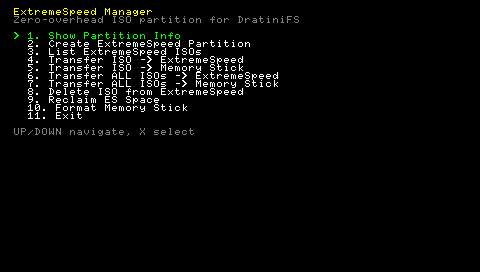
ES carves out a raw partition (type 0xDA) from the SD card alongside the filesystem partition (FAT32 / exFAT). ISOs are stored sequentially with no filesystem overhead — no FAT chain, no directories, no cluster boundaries. You transfer your game ISOs from your normal filesystem over to the ES partition using the bundled ExtremeSpeed homebrew app (yes i know the UI is ugly now, i’ll make it pretty later). Another cool byproduct of using ES, is you can have all your game ISOs on on ES and even when you format (using the ES homebrew) your memstick, the ES partition remains. So you can refresh your sdcard any amount of times without losing your games and having to copy everything over again!
Reading byte X from ISO N is pure arithmetic:
abs_sector = partition_start + entry[N].start_sector + (X / 512)Zero FAT lookups. Zero directory traversal. Zero cluster math. This is the fastest you can theoretically and practically achieve on the PSP.
Typical ES partition layout:
Sector 0:          Superblock (512 bytes, CRC32 protected)
Sectors 1-79:      ISO table (1 entry per sector, atomic writes)
Sector 80:         Superblock backup
Sectors 81-127:    Reserved
Sector 128+:       ISO data, packed sequentially
Each ISO table entry is exactly 512 bytes — one per sector. This means every entry write is atomic. If power is lost mid-write, either the old entry or the new entry is on disk. Never a corrupt half-written entry.
DratiniFS adds full exFAT read/write support with 128KB clusters — 4× larger than FAT32. The benefits compound:
| Feature | FAT32 (32KB clusters) | exFAT (128KB clusters) |
|---|---|---|
| Max file size | 4 GB | Unlimited |
| Cluster chain entries per GB | ~32,000 | ~8,000 |
| FAT cache coverage | 4 MB | 16 MB |
| Bitmap scan at init | N/A (FSInfo) | Full scan (msstor warmup) |
I gotta hand it to SONY devs. The original PSP is an amazing piece of hardware for the time it came out and the software engineers really were able to crank out something truly beautiful. But throughout this project, there was always this thing hanging over my head that I just couldn’t defeat: race conditions. They’re everywhere when it comes to the PSP’s aging controller. ExtremeSpeed ISO loading was so fast gameid pulls or certain game specific functions would cause a race condition and result in catastrophic failure (either a game crash or system crash).
The PunchBuffer
Enter the PunchBuffer. A term we often use in speedrunning games, as a way to sync up time + movement to ensure frame accuracy. In programming, it’s an input buffer or even buffer, and when dealing with variable speeds, they should never be used / relied on when it comes to coalescing some sort of consistency in your code. In this case, I made an exception. The internal punch buffer will effectively “slow down” the boot process for system and CFW to “catch up” and allow custom game functions to run. However, it’s not perfect and still is inconsistent between identical PSPs, even identical sdcards, but not between identical batched sdcards hmmmmm…..
Known Issues / Workarounds
– Depending on your sdcard / format type, plugins may or may not load. If it works, lucky you!
– Games that use gameid may lose the race condition even with the PunchBuffer, so some games I’ve seen with the DATAINSTALL feature (like MGS: PW) will fail to copy. Either do the datainstall from FAT32 and then run the ES game or run all datainstalls beforehand and copy them over to your exFAT / ES sdcard.
– If your exFAT format is wonky or weird, try using the ES homebrew’s built in formatting tool (yes the ES app will still be on your sdcard after the format).
MSSTOR is annoying. Like, really annoying. Almost as annoying as sony’s original fatms. The driver silently returns short writes above 64 KB. With 128 KB exFAT clusters, the IoWrite fast path tried to write 256 sectors (128 KB) in one call. Half the data was silently dropped. I had to cap writes to 128 sectors (i tried less and more and it wasn’t worth it really) with short-write handling. Actual bytes not requested bytes. Oh boy.
exFAT has a 32-bit checksum over the 11-sector boot region (excluding VolumeFlags and PercentInUse bytes). When creating or resizing partitions, the checksum must be recomputed and written to sector 11 + backup at sector 23. Miss a byte and windows marks the volume as write-protected :/
I somehow missed dcache flushing optimization while DMA wrote to disk, but it wasn’t obvious at first because no matter how much logging I did, it would skip the optimization that I had done due to another race condition!! Argh!!
Instead I just sceKernelDcacheWritebackInvalidateRange(buf, nbytes) before k_sceIoWrite. There’s just no other more efficient way around this. Sony’s fatms does this naturally after I found out probing it out of frustration!
Then finally, exFAT directory entries are 32 bytes each, but entry sets (File + Stream + Name entries) can be 96+ bytes. When an entry set starts near byte 480 of a sector, it spans into the next sector. The delete handler only cleared entries in the current sector… basically leaving orphaned secondary entries that corrupted the directory.
I had to read the next sector, clear bit 7 on all entries over both sectors, then write both back. But THEN, it was way simpler to just use 512 byte sector-aligned entries atomically, basically destroying a weeks worth of spare time used. Ouch.
Anyways, I’m quite satisfied with both modules and would love your feedback as well as bug reports directed to our Discord Server. And yes, I plan to fully open-source everything I’ve done after we finish testing all these new edge cases as well as getting it to a stable state. Anyone who’s interested in more technical implementations please DM me for more information, and when I have some time I can fulfill it.
Also, to quickly address the name. In Pokemon Crystal (GBA game from the 90s), there’s a certain point where you’re asked a series of questions, and depending on your answers, if you answer with only loving and compassionate answers you’ll be given a Dratini with ExtremeSpeed (just coincidence there’s a memory stick marketing jargon for extreme speed). It is the only way you can get a Dratini with ExtremeSpeed in the entire series aside from special events etc. Leftovers is also an item you can let your Pokemon hold that slowly fills up your entire health bar in small partitions during battle.
ATTENTION!
DratiniFS is highly experimental! It replaces a crucial component of your PSP’s firmware and could brick your device! Please only use it if you have cIPL installed / NAND Backup / Time Machine / MagicMemoryStick / DCARK setup with a Pandora Battery as backup… All development and my personal testing has been on a PSP 1000 with ARK 4 (v205). Other testing has been on a 3K. BE CAREFUL!
DratiniFS with ES Features:
– FAT32 support
– exFAT support
– ExtremeSpeed support
– Native USB Mode for both FAT32 and exFAT
– Native Format Memory Stick (within XMB)
– Sleep / Wake (inconsistent between models and sdcards)
Leftovers Features:
– Multiple partitions of any size < 441 GB
– HOLD L + R + Directional Keys to switch between partitions (up and down jump you to first and last).
– Native USB Mode (shows all partitions depending on what partition manager you used)
– Sleep / Wake (tested with 64 GB, SanDisk 128 GB Extreme Pro, SanDisk 1TB Extreme Pro)
Downloads:
DratiniFS.zip (12 downloads )Leftovers.zip (12 downloads )
If you like my work, grab me a cup of coffee for the effort: https://buymeacoffee.com/fzzylogic
If you need help installing or setting it up, let me know on discord: https://discord.gg/fuzzylogic